by
These are the DISTILL x 5 release notes: every Dx5 update in one place, newest first. For each release, you’ll find what changed, why it matters and how to use it.
Most of what we ship is the work you notice on a busy production day: an adjustment that lands in the right lot, a storage report that adds up or an order that ships the first time.
Last updated: 11/17/2026
NOVEMBER 5, 2026 RELEASE
This release builds on Lot Tracking and fixes five issues across reports, batches and orders. Here’s what changed and what it means for your day.
LOT TRACKING: EVERY QUANTITY ADJUSTMENT NOW HAS A LOT
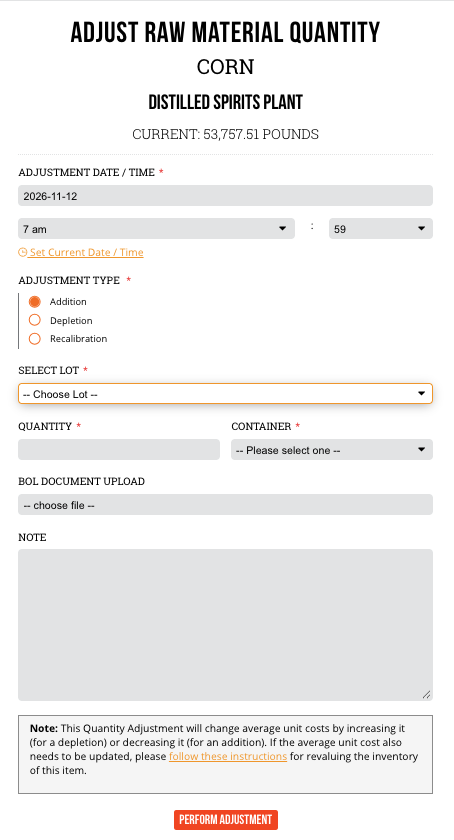
If you use Lot Tracking, quantity adjustments now follow one rule across Raw Materials, Supplies and Finished Products: every adjustment is recorded against a lot.
When you add quantity, you choose where it goes. Add it to an existing lot, or create a new one. If an item doesn’t have any active lots yet, Create New Lot is the only option, so added quantity always has a lot attached.
WHY IT MATTERS: Before this change, adding quantity to a Raw Material or Supply with no active lots could raise your quantity on hand without tying it to a lot. Finished Products additions could only go into a brand-new lot. Now added quantity goes into the lot it belongs to, and every change shows up in your lot records.
HOW TO USE IT:
- Go to Item Actions > Adjust Quantity.
- For an Addition, choose an existing lot or select Create New Lot.
ONE SMALLER FIX: the Total Value field on Add New Item for Raw Materials and Supplies always accepted a value, but it looked grayed out. It now looks like the editable field it is.
FIXES FOR REPORTS, BATCHES AND ORDERS
YOUR STORAGE REPORT COUNTS EACH BULK RECEIPT ONCE
If your Monthly Report of Storage Operations turned red after a bulk receipt, this fix is for you. A bulk receipt could show up on both line 2 and line 3, which pushed line 6 too high. Each receipt now lands on one line based on the product received: customs products on line 3, non-customs products on line 2.
This applies to reports for November 2026 and later. Earlier months stay as they are.
UNDOING A WATER CUT IS BLOCKED AFTER LATER ACTIONS
Previously, you could undo a water cut after a dump on the same batch, which left the dump impossible to undo. Dx5 now blocks undoing a water cut if anything else has happened on the batch since the cut, and a message explains why. Later actions on the batch don’t get stuck.
SHIPPED ORDERS STAY AS SHIPPED
Line items on a shipped order could be edited or removed through a saved or direct link, which left inventory out of line with the order. Dx5 now blocks those changes on shipped orders and shows a message. Need to change what shipped? Unship the order first.
AUTOMATIC LOT PICKING SHIPS ORDERS WITH MULTIPLE UNITS PER CASE
If you ship lot-tracked products with more than one unit per case and let Dx5 pick the lots, you may have hit a “Failed to issue sale” error. That’s fixed. Dx5 now assigns lots automatically, oldest first, based on the bottles available in each lot, so the order ships. If you’d been picking lots by hand to get around it, you don’t need to anymore.
TRANSACTION REASON LINKS OPEN THE RIGHT RECORD
On the Finished Products details page, links in the Reason column of Inventory Transactions could lead to a browser security warning instead of the record. They now open the related Bottling, Batch, Order or PO record.
BEHIND THE SCENES
This release also includes infrastructure and security enhancements to support reliability and performance. You won’t see them on screen, but they help keep Dx5 running the way you count on.
KEEP UP WITH DISTILL x 5 RELEASE NOTES
We’ll keep adding new releases to the top of this page as they ship, so you can always see what changed and why.
Something in Dx5 slowing you down? Tell our Support team. Fixes like these often start with you.